
Vibe Coding Stuck? How to Recover Your AI-Built App
If your vibe-coded app is stuck in a loop, stop prompting blindly. Use this recovery guide to diagnose the failure layer, protect working progress, rebuild context, and choose the safest next move.
Explore this article
- First: being stuck does not mean you were foolish to start
- Diagnose the layer before you diagnose the tool
- Why repeated prompting creates a regression loop
- Build a context packet instead of writing a bigger prompt
- The architecture ceiling: when prompting is no longer the bottleneck
- Base44, Lovable, Bolt, Replit, Cursor, and Windsurf fail differently
- When Base44 is stuck
- When Lovable is stuck
- When Bolt is stuck
- When Replit Agent is stuck
- When Cursor is stuck
- When Windsurf is stuck
- The blockers that rarely disappear through prompting alone
- When the app works but the design still feels stuck
- When to stop fixing it alone
First: being stuck does not mean you were foolish to start
There is a particular kind of frustration that appears in AI-assisted building. The first hour feels almost unreal: a description becomes a screen, the screen becomes a flow, and the flow starts to resemble the product you had been carrying in your head. Then a small change breaks something unrelated. You ask for a repair. The repair moves the problem. The tool says it has fixed the issue, but the behaviour remains. After enough cycles, you stop trusting the app, the agent, and eventually your own judgment.
That emotional drop is not trivial. Fast early progress resets your expectations. Once the tool has created ten visible things in minutes, spending two hours on one invisible authentication or state bug feels like evidence that everything has gone wrong. It is not. The project has moved from a phase where visual output is cheap into a phase where correctness depends on relationships the interface does not show.
Vibe coding is powerful because it compresses the distance between an idea and a testable artifact. It does not remove the underlying system. Your app still has files, dependencies, data models, permissions, environment variables, network calls, deployment settings, failure states, and assumptions about what happens first. As the build grows, those parts interact. A conversational tool can hide much of that complexity until the moment the complexity matters.
So the first recovery move is psychological and practical: stop treating the next prompt as a referendum on whether you are capable. Treat the stuck state as evidence. Something about the system is unclear, inconsistent, or outside the current tool's reliable view. Your job is not to sound more persuasive to the AI. Your job is to reduce uncertainty until one safe next action becomes obvious.
- Vibe coding stuck
- A state in which conversational changes no longer produce predictable progress and the builder cannot confidently explain, verify, or reverse what the system is doing.
The app may still render and the AI may still respond. What has stalled is controlled progress: each attempt creates equal or greater uncertainty, side effects, regressions, or dependence on guesses.
Diagnose the layer before you diagnose the tool
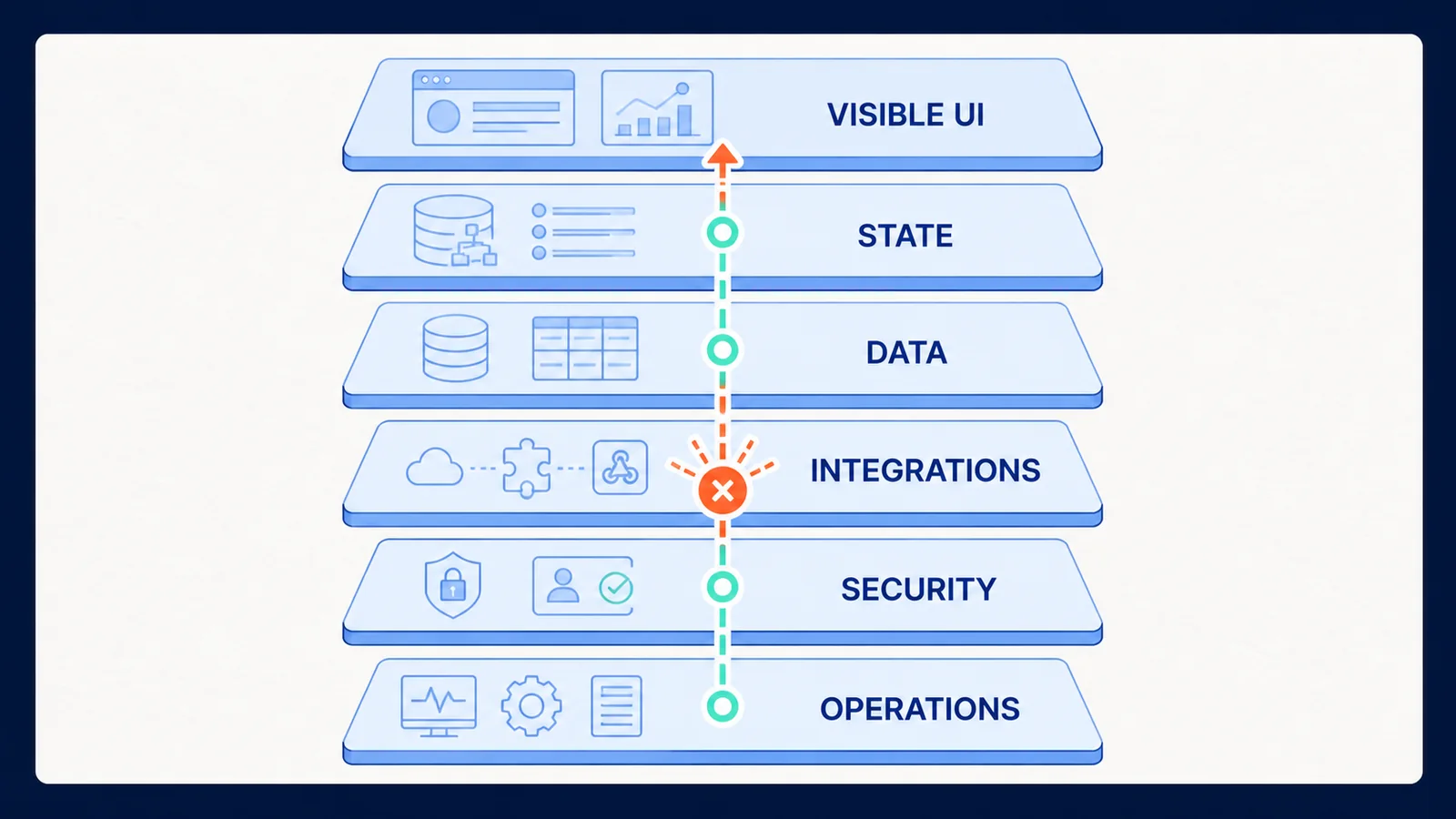
Most stuck projects become easier to reason about when you separate six layers. The visible UI includes layout, components, navigation, forms, feedback, and browser behaviour. State is what the application currently believes: who is signed in, which record is selected, whether a request is loading, and what temporary values exist. Data covers schemas, records, queries, migrations, validation, and ownership. Integrations include APIs, webhooks, email, payments, storage, analytics, and third-party services. Security covers identity, authorization, secrets, row-level rules, input boundaries, and data exposure. Operations covers builds, environment variables, domains, deployment, logs, monitoring, backups, and recovery.
A symptom can travel upward. A button that appears dead may be perfectly wired but waiting on a request that fails because an environment variable is absent. A user who keeps returning to the login page may be authenticated but unauthorized to read the profile record required by the next route. A blank preview may result from one syntax error, a broken import, an initialization loop, or a security header. Asking an agent to fix the button encourages it to edit the visible layer even when the cause is elsewhere.
Write down the observable fact without interpretation. Not: 'authentication is broken.' Instead: 'after submitting valid credentials, the browser returns to /login; the network panel shows a successful session request followed by a 403 on /api/profile.' That sentence contains a path, a trigger, a result, and evidence. It gives the AI and any human reviewer a much smaller search space.
Then ask which layer first became inconsistent. If the failure began immediately after a schema change, start with data. If local preview works but the published app fails, start with operations and configuration. If only one user role fails, start with authorization. If the interface shows old information after a successful save, inspect state invalidation and data reads before redesigning the form.
This is the central shift from vibe repair to engineering recovery: stop naming the feature that disappoints you and start locating the boundary where expected and observed behaviour diverge.
| What you see | Likely layers | First useful evidence | Avoid doing first |
|---|---|---|---|
| Blank or white preview | UI, runtime, routing, operations | Build output, browser console, first failing request | Restyling the page or repeatedly saying fix it |
| AI says fixed but nothing changes | Context, target file, deployment, caching | Changed-file list, diff, deployed version, cache state | Repeating the identical prompt |
| One fix breaks another feature | Shared state, coupling, broad edit scope | Diff between known-good and current state | Asking for a whole-app cleanup |
| Login or permissions loop | Identity, authorization, data rules | Session state, role, failed request, policy result | Disabling security controls |
| Data saves but does not appear | Data, query, cache, state | Write result, record ID, follow-up read, cache invalidation | Changing the form design |
| Works in preview, fails when published | Environment, build, domain, secrets | Production logs, environment comparison, deployment output | Rebuilding the feature from scratch |
| Agent edits the wrong area | Context selection, stale conversation | Exact files involved and explicit exclusions | Adding a longer vague description |
| Prompts consume time without narrowing cause | Evidence and process | Attempt log: hypothesis, change, result | Buying more credits before changing method |
Why repeated prompting creates a regression loop
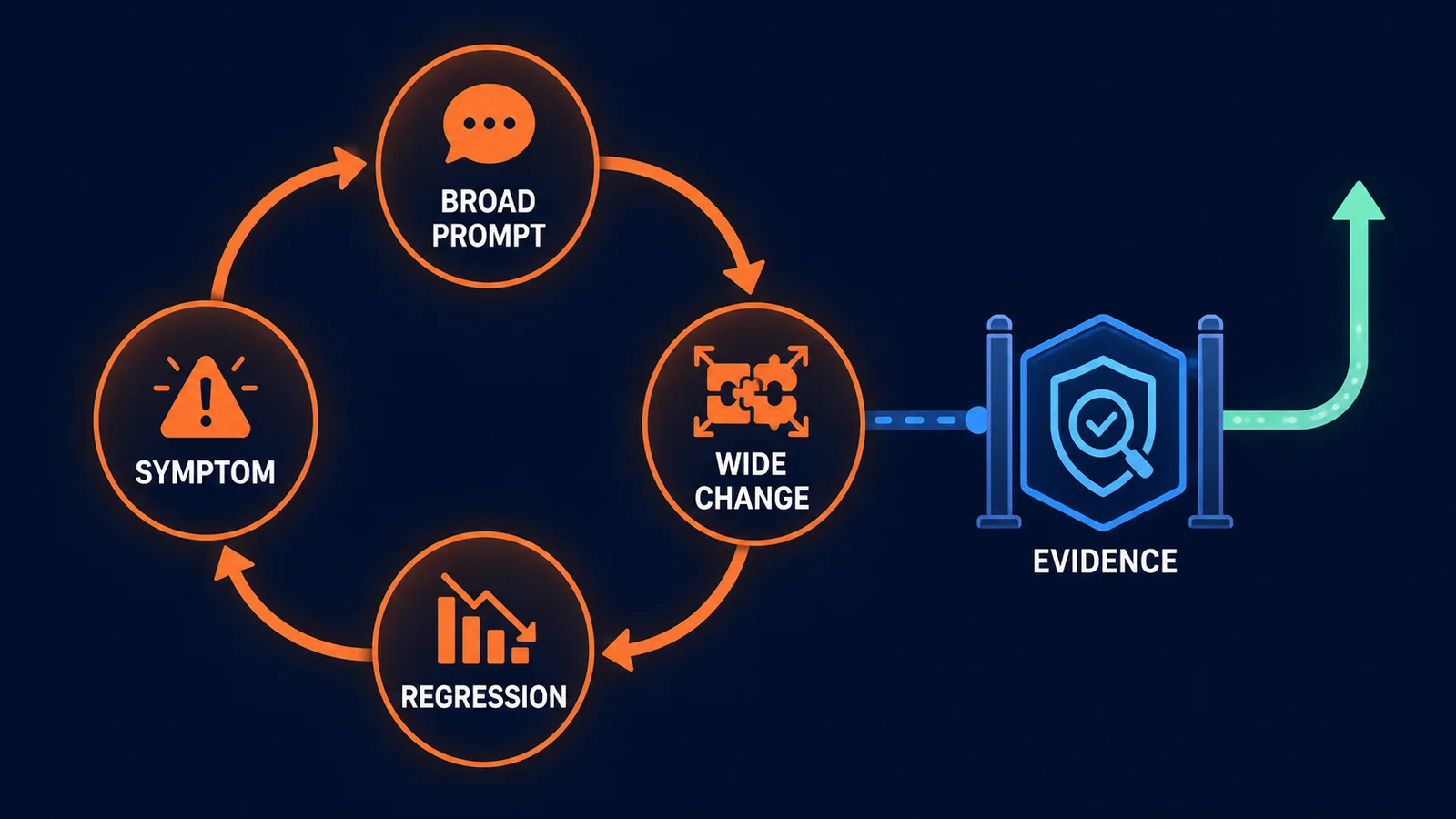
A broad repair request usually contains a symptom but not a boundary. The agent has to infer which files matter, what behaviour is intentional, which earlier decisions remain valid, and how success should be measured. If its first hypothesis is wrong, it can still produce a plausible edit. The edit may hide the symptom, create a second path, duplicate logic, weaken a guard, or change a shared component that other features depend on.
The next prompt begins from a noisier state. You now describe the original issue plus the new side effect. The agent sees more files, more conversation, and more contradictory signals. It proposes a wider change. This is prompt drift: the task gradually changes from one observable defect into a general request to make the system behave. The conversation accumulates explanations, but the system gains fewer reliable constraints.
Context windows matter, but not because there is one magical token limit at which every tool fails. The practical problem is relevance. A model can receive a large amount of information and still miss the one invariant that should not change. Old instructions compete with newer corrections. Generated summaries compress details. Automatic code search retrieves what looks semantically related, which may not be the code that owns the behaviour. The agent can also know the code and still lack the production state, secret, external response, database policy, or user record needed to explain the failure.
Official guidance from several builders points in the same direction. Bolt advises smaller, single-change prompts, a maintained README, context resets between major tasks, debug logs, and smaller files for larger projects. Lovable recommends Plan mode, logical build order, screenshots or logs, stepwise work, and reverting when a clearer prompt is safer. Replit emphasizes specificity, planning, context, testing, and checkpoints. Cursor distinguishes intent context from state context and recommends surgical file or symbol references. These are product-specific controls, but they all address one underlying problem: useful action depends on relevant state, bounded intent, and a way to verify the result.
The loop ends when you insert evidence between symptom and change. Evidence can be a reproducible sequence, a console error, a failed request, a diff, a database row, a test, or a comparison with a known-good checkpoint. It does not need to be highly technical. It needs to make one explanation more likely than the others.
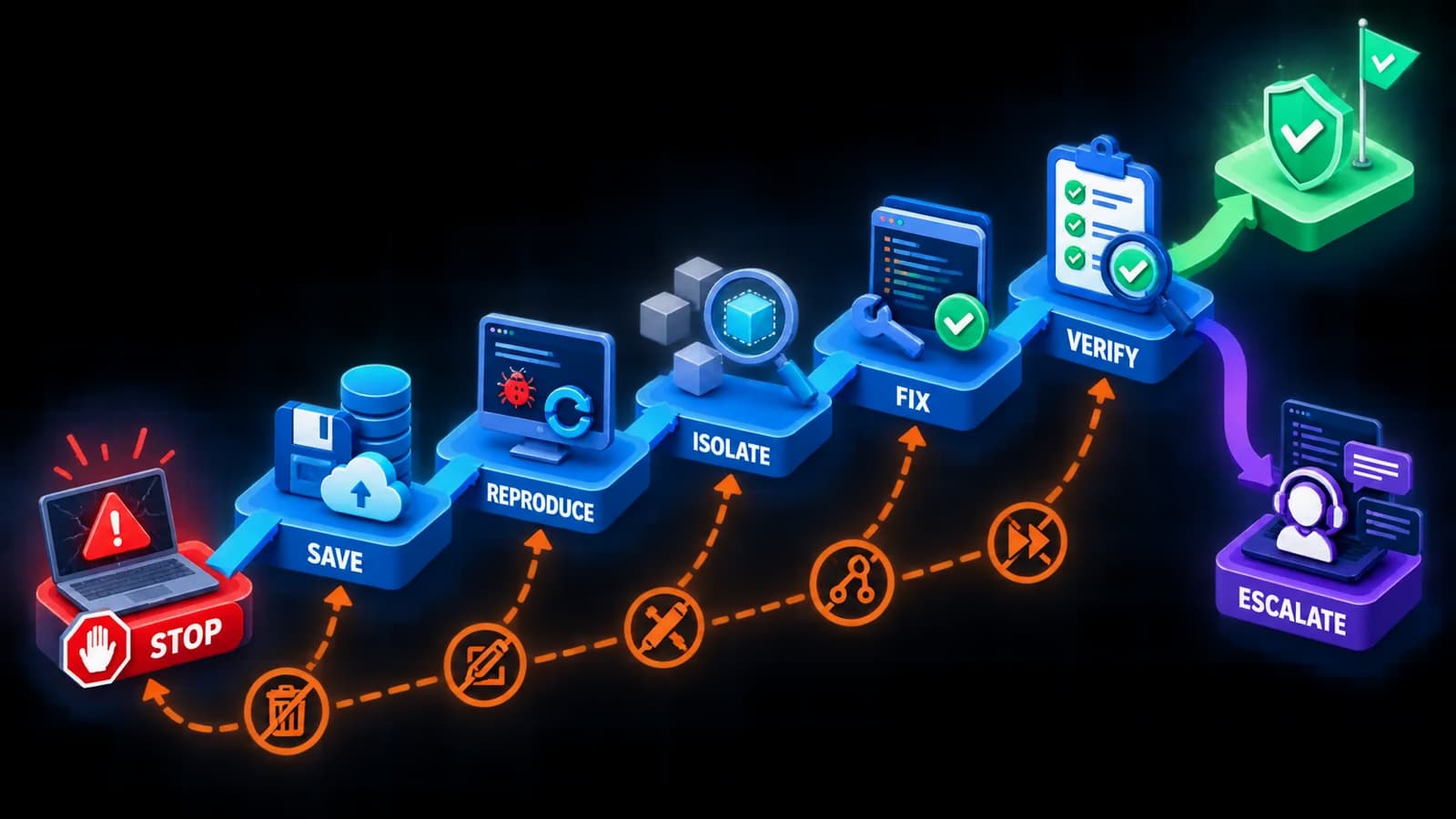
The first 20 minutes: a controlled recovery sequence
- 01
1. Stop the edit loop
Do not send another repair prompt while you are still describing several symptoms at once. Pause long enough to separate what is known from what is assumed.
- 02
2. Preserve the current state
Create a checkpoint, commit, duplicate, export, or platform snapshot. Record whether databases and external services are included. A code rollback may not reverse data changes.
- 03
3. Find the last known-good state
Identify the latest version in which the affected flow definitely worked. Use a real action and result, not a memory that the page looked fine.
- 04
4. Reproduce one failure
Write the shortest sequence that causes the issue: starting state, action, expected result, actual result. If it cannot be reproduced, collect when and for whom it occurs.
- 05
5. Capture evidence
Save the exact error, screenshot, console output, failed network request, relevant log line, changed files, and timestamp. Remove secrets before sharing.
- 06
6. Classify the layer
Choose the most likely first failing layer: UI, state, data, integration, security, or operations. State what evidence supports that choice and what would disprove it.
- 07
7. Compare the change
Inspect what changed since the known-good state. If the tool offers a diff or history view, use it. Look for unexpected files, duplicated logic, dependency changes, and removed checks.
- 08
8. Choose rollback or fix-forward
Roll back when the last change widened damage or its intent is unclear. Fix forward when the cause is isolated, the correction is small, and a test can verify it.
- 09
9. Request one bounded action
Tell the AI what it may inspect, what it may change, what it must not change, and what proof it must return. Ask for analysis first if the cause remains uncertain.
- 10
10. Verify beyond the happy path
Repeat the failing flow, test one nearby flow, inspect errors, and confirm the deployed environment if relevant. Save the repaired state before starting a new feature.
Build a context packet instead of writing a bigger prompt
A useful recovery prompt is not necessarily long. It is structured. Begin with the goal in one sentence. Then describe the current state using facts: the route, user role, record, environment, or file involved. Include the minimal reproduction steps and the exact observed evidence. Name constraints, especially the working behaviour that must remain unchanged. Define an acceptance test that a person or tool can execute. Finally, state the rollback boundary.
For example: 'Analyze only; do not edit yet. On the published app, an authenticated member submits /settings/profile. The PATCH request returns 200 with the correct record, but refreshing shows the old display name. Local preview behaves correctly. The issue began after the caching change in checkpoint 18. Inspect the profile write, profile read, and cache invalidation paths. Do not change authentication, schema, or UI. Return the most likely cause, supporting evidence, files that would need modification, and a test plan.'
That prompt gives the agent intent context and state context. It also prevents an attractive but irrelevant redesign. When the analysis is credible, the implementation prompt can be even smaller: 'Apply the proposed cache invalidation change only in the identified read path. Add or update a test that proves a successful write is visible after refresh. Run the relevant tests and report the files changed.'
Persistent project knowledge belongs outside a temporary repair conversation. Record the product purpose, architecture, data ownership, routes, roles, naming, design rules, forbidden changes, commands, and definition of done in the mechanism your tool supports: project knowledge, a README, repository rules, or an AGENTS.md file. Keep it concise and current. A huge document that contradicts the code becomes another source of drift.
If the product is still only an idea, create a small requirements baseline before more implementation. The UmarCode guide to writing a technical requirements document with AI help shows how to use AI without surrendering control of the specification. The aim is not bureaucracy. It is to preserve decisions that should survive beyond one chat.
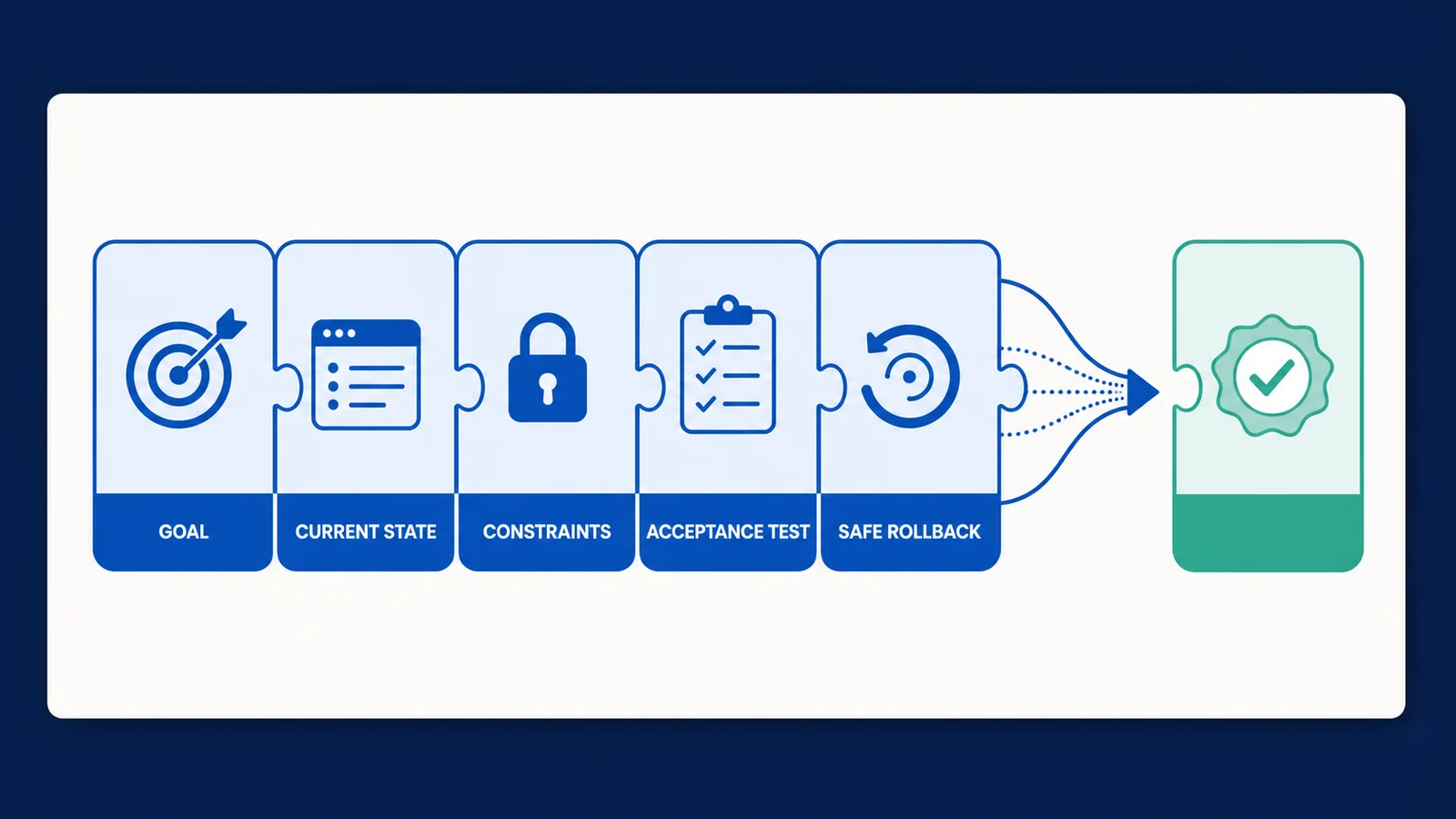
MODE: Analyze only. Do not edit files yet.

GOAL:
[One outcome.]

CURRENT STATE:
[Environment, route, user role, data, and last known-good checkpoint.]

REPRODUCTION:
1. [Starting state]
2. [Action]
3. [Observed result]

EXPECTED RESULT:
[One observable result.]

EVIDENCE:
[Exact error, request, log, screenshot, diff, or test failure.]

CONSTRAINTS:
- Do not change [working system].
- Do not weaken [security or validation].
- Inspect only [files or layers] first.

RETURN:
- Most likely cause and evidence
- Alternative cause worth checking
- Smallest safe change
- Files affected
- Verification steps
- Rollback point| Strategy | Use it when | Main advantage | Main risk |
|---|---|---|---|
| Fix forward | The cause is isolated, the change is small, and verification is available | Preserves useful recent work | A wrong diagnosis adds another layer of change |
| Roll back | The last change created several regressions or its scope is unclear | Returns to a trusted baseline quickly | Data or external side effects may not roll back with code |
| Refactor a boundary | The same area repeatedly breaks because responsibilities are mixed | Reduces future ambiguity and edit scope | Refactoring without tests can move defects rather than remove them |
| Rebuild one component | A bounded component is disposable and its contract is understood | Can remove accumulated generated complexity | The replacement may repeat hidden assumptions |
| Migrate the project | The platform blocks required control, portability, testing, or operations | Restores ownership of critical capabilities | Migration exposes dependencies the platform had hidden |
| Expert escalation | Consequence is high or evidence remains ambiguous after focused attempts | Reduces the cost of blind experimentation | A reviewer still needs a clean reproduction and project access |
The architecture ceiling: when prompting is no longer the bottleneck
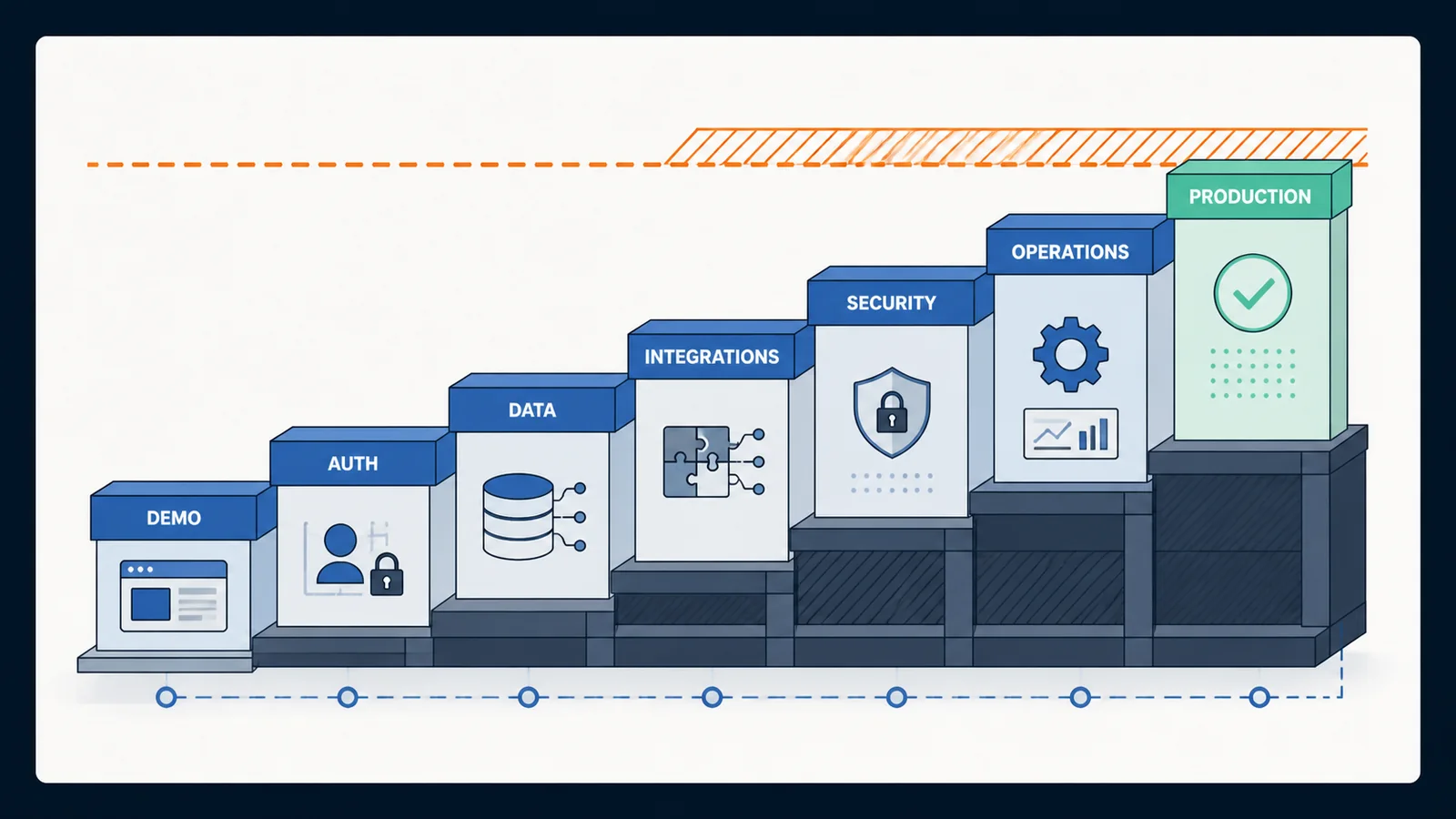
A prompt can describe a feature, but it cannot repeal the dependencies that make the feature reliable. Early in a project, most work is additive: create a page, add a card, connect a form, display a record. Later work is relational: ensure the correct user can change the correct record, preserve consistency across concurrent actions, recover from partial failure, rotate secrets, reconcile webhooks, handle duplicate events, observe production behaviour, and migrate data without losing meaning.
This is the architecture ceiling. It is not a fixed size and it is not unique to AI-generated code. It appears when the next requirement depends on decisions the current system has not made explicitly. Who owns session state? Where is authorization enforced? Which source is authoritative? What happens if payment succeeds but the confirmation write fails? Can the same request be retried? How is a bad deployment reversed? If the answers exist only as accidental behaviour across generated files, every new prompt asks the agent to infer architecture from symptoms.
The answer is not automatically a rewrite. Often the best move is to stabilize one boundary: centralize authorization, define a service for one domain action, separate display state from server state, create a migration path, add a verification test, or move one integration behind a narrow adapter. The same discipline used to modernize legacy software without a risky full rewrite applies to a young AI-built application: preserve what works, expose dependencies, and replace uncertainty in bounded stages.
A convincing demo also has a production gap. The demo proves that a path can work under friendly conditions. Production asks whether it keeps working for different users, stale sessions, bad inputs, slow networks, repeated requests, missing permissions, external outages, changed data, and operational mistakes. UmarCode's analysis of the pilot-to-production gap focuses on AI agents, but the governing lesson transfers: visible capability is not the same as an operable system. Ownership, evaluation, monitoring, permissions, and recovery become part of the product.
Signs that you have reached an architecture ceiling include the same bug returning in different forms; several files implementing the same rule; security checks living only in the interface; database changes made ad hoc through prompts; no one knowing which environment or record is authoritative; production fixes that cannot be tested locally; and fear that touching one feature will break three others. At that point, another broad prompt can produce more code, but not necessarily more control.
Base44, Lovable, Bolt, Replit, Cursor, and Windsurf fail differently
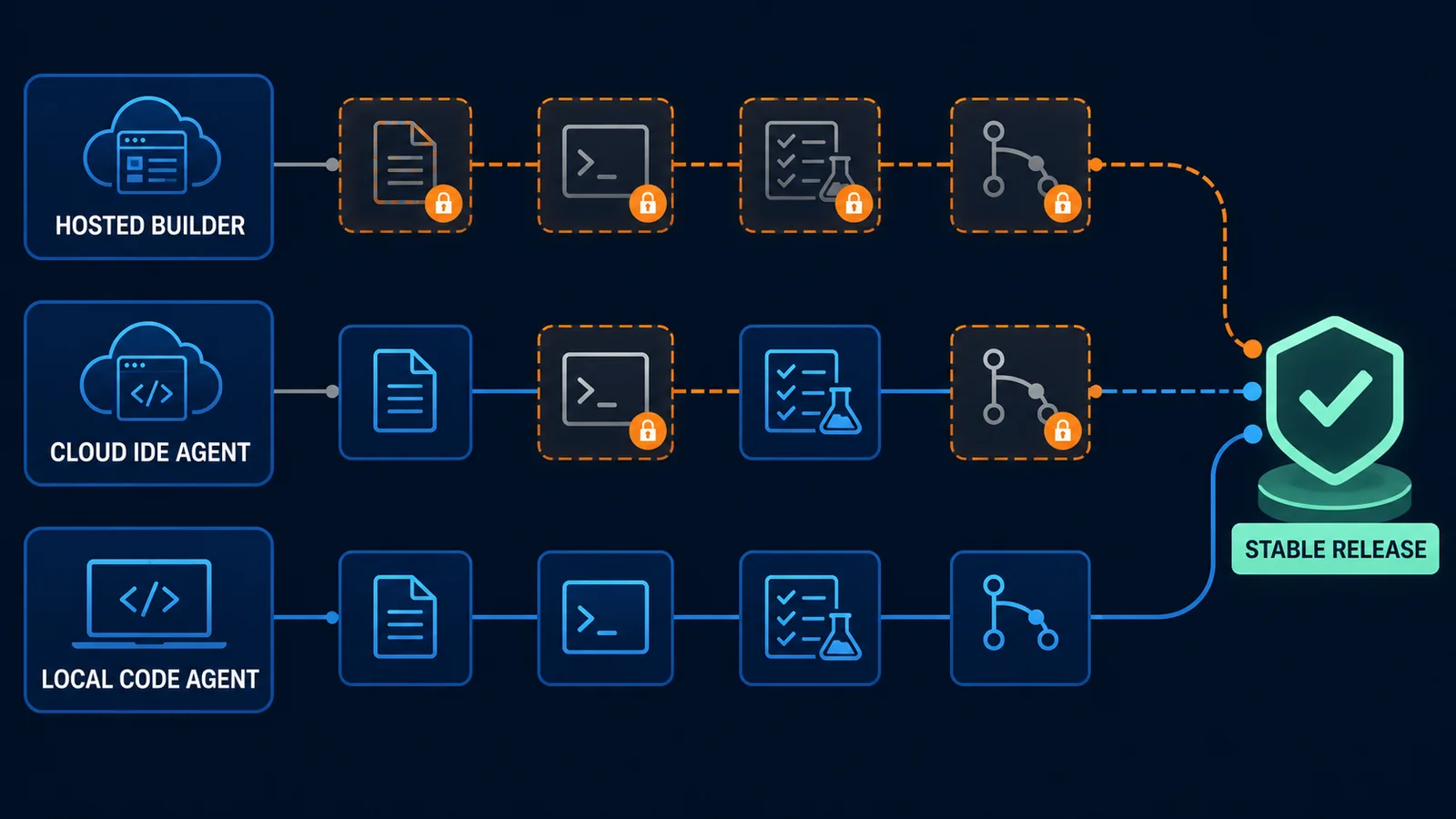
All six products can help create software, but they expose different parts of the system and give the builder different recovery controls. A hosted app builder may make database, authentication, deployment, and editor state feel like one product. A cloud IDE agent exposes more files, terminal output, and version history. A local code agent works closer to a conventional repository, where the user owns more of the runtime and delivery process.
That difference matters when you are stuck. Advice that assumes terminal access is useless if your platform hides the runtime. Advice to clear chat context can be dangerous if the conversation contains the only record of an architectural decision. A rollback may restore files but not production data. A fresh conversation may improve focus but lose a critical constraint unless you wrote it into project knowledge.
Use the sections below as recovery orientations, not permanent verdicts about the products. Features and interfaces change. Follow the linked first-party documentation for current controls, and judge each recommendation against your project's actual data, deployment, and consequence.
When Base44 is stuck
Base44 combines conversational building with managed application capabilities, so begin with its own recovery surface. Its official troubleshooting guide recommends using the chat to analyze what is wrong, checking platform status, reverting the last message for some failures, refreshing, clearing the chat when appropriate, and contacting support with the prompt and error if the issue continues. Its guidance also treats security rules as something to verify with the built-in security check and role testing, not something to bypass.
If the initial build remains on Thinking, distinguish slow creation from a partially created app. Avoid stacking more instructions into a long first prompt. Preserve the original prompt, inspect what exists, and break the build into sequential outcomes. If cloning or creating a clean app becomes necessary, record which data, settings, integrations, and domain configuration will not automatically follow.
For a functional app with one broken area, revert only when you understand the boundary of that message. Then reproduce the issue by role and record. Use the platform's security checks for data access problems, and verify with multiple roles. If a generated backend function fails repeatedly, ask for analysis of that function and its inputs rather than a whole-app repair. Escalate before experimenting with live customer data or permissions you cannot independently audit.
When Lovable is stuck
Lovable's troubleshooting guidance recommends trying its repair control, reverting and re-prompting unexpected behaviour, using Plan mode, working step by step, supplying screenshots for UI problems, inspecting logs for edge functions, and checking common causes of blank previews such as runtime, routing, authentication, or configuration problems. That order is useful because it separates quick platform help from deeper diagnosis.
Use project and workspace knowledge for persistent architecture, business terminology, design rules, and constraints. Do not expect a long conversation to preserve every instruction consistently. Keep project knowledge compact, resolve conflicts, and store durable repository guidance in an instruction file when appropriate.
When a fix is visible, verify it with the tool suited to the behaviour. Lovable documents browser testing for user-visible flows, frontend tests for behaviour that must remain stable, and direct or edge tests for backend functions. If you are stuck after several attempts, ask Lovable to compare the failing flow with the last stable version and propose rollback versus fix-forward before editing. A successful preview is a useful checkpoint, not proof that roles, data policies, external calls, and published behaviour are correct.
When Bolt is stuck
Bolt's official issue guide is unusually direct about repeated prompting: if a simple preview repair does not work, continuing the same request is unlikely to help and can consume tokens. Switch into a discussion or planning mode, inspect build output, run the documented build command when appropriate, audit environment variables, and use browser logs to replace guesses with evidence.
For larger projects, Bolt recommends one scoped change per prompt, a README that explains the project, context resets between major tasks, debug logging, and splitting very large files. Its prompting guide also supports targeting specific files, locking files or directories that should not change, and selecting a precise code section. Those controls are especially valuable when a repair keeps damaging neighbouring features.
Before using /clear, save durable decisions into the README or project knowledge and record the last stable version. After clearing, ask Bolt to read that source of truth and analyze the evidence before editing. If a project works in preview but not when published, compare environment variables, build output, domain behaviour, and deployed assets. Do not ask Bolt to rebuild a working feature until deployment and runtime causes have been excluded.
When Replit Agent is stuck
Replit's build-with-Agent guidance frames the user as the person leading the process: be specific, plan, add context, review, test, and use checkpoints. If the last change made the app worse, compare the current state with the previous working checkpoint and decide whether to fix forward or roll back.
Replit checkpoints can capture files, conversation context, configuration, agent memory, and development database state, but read the rollback documentation carefully. Database restoration is optional in the development rollback flow, and production database restoration is a separate concern. That distinction matters if a code rollback expects a schema or record state that no longer exists.
Use a checkpoint as a diagnostic boundary. Review its changed files and description, reproduce the failure, and test after restoration. Maintain manual Git history for long-term traceability instead of treating automatic checkpoints as the only record. If the Agent has enough context but cannot stabilize a feature, narrow the task to one route or function, supply the exact runtime evidence, and ask for an explanation of the causal chain before implementation.
When Cursor is stuck
Cursor exposes a conventional codebase, so the problem is often context selection or uncontrolled edit scope rather than access to the code. Its context guide distinguishes intent context from state context. Tell the agent what outcome you want, but also attach the error, logs, files, symbols, and runtime state that describe the world it must change.
Use surgical references when you know the owner of the behaviour. Ask the agent to search and explain when you do not. Cursor's project rules can preserve architecture, workflows, and conventions in version-controlled, scoped files; AGENTS.md offers a simpler repository instruction mechanism. Keep rules focused and actionable. Do not turn them into a second undocumented application whose instructions conflict.
When Cursor begins changing too much, stop edits and request a plan plus expected file list. Review the diff before running or accepting it. Run the smallest relevant test, then the neighbouring suite. If context has become crowded, compress or start a focused thread only after durable decisions are recorded. The ability to edit every file is power, not evidence that every file should change.
When Windsurf is stuck
Windsurf Cascade uses automatic Memories and user-defined Rules to carry context. Its Memories and Rules documentation recommends Rules or AGENTS.md for knowledge that must be reused reliably and shared with a team, rather than depending only on automatically generated memories.
If Cascade repeatedly ignores a constraint, check where that constraint lives, how the rule activates, and whether a broader instruction conflicts with it. Convert a durable decision into a scoped rule; do not keep correcting the same behaviour in chat. For a single failure, provide the current state, specific files, runtime evidence, and exclusions. Ask for analysis before edit when the owner of the behaviour is unclear.
Treat memories as helpful context, not an audit record. Use version control, tests, and explicit project documentation to preserve what the system must do. When a long Cascade session has moved across unrelated tasks, create a clean task boundary and restate the relevant project source of truth. If the failure touches deployment, data, permissions, or an external service, confirm what Cascade can actually observe before accepting its diagnosis.
| Environment | Examples | Best first controls | Hidden risk to check |
|---|---|---|---|
| Hosted builder | Base44, Lovable | Platform repair, history or revert, project knowledge, built-in logs and testing | Managed data, auth, and deployment state may not move with a code-level assumption |
| Browser or cloud code builder | Bolt, Replit | Build output, terminal, checkpoints, file targeting, README, Git history | Development rollback may differ from production data and external effects |
| Repository-first code agent | Cursor, Windsurf | Scoped context, rules, diffs, tests, Git branches, runtime logs | Broad filesystem access can widen changes without improving diagnosis |
The blockers that rarely disappear through prompting alone
Authentication and authorization are common ceilings because the visible login flow is only one part of identity. A system can authenticate a user correctly and still authorize the wrong records, trust a role stored in the browser, expose an administrative function, or create a redirect loop when profile state and session state disagree. Never solve this by removing checks until the page loads. Test each role against allowed and forbidden actions, enforce decisions on the server or data boundary, and verify with real requests.
Data problems often hide behind friendly interfaces. Generated schemas can accumulate duplicated fields, inconsistent identifiers, missing constraints, unsafe defaults, and queries that assume records exist. Before changing a schema, export or back up what matters, identify the source of truth, and map every reader and writer. A migration is not complete because the editor reports success. Existing data, new data, rollback, and deployed code must agree.
Integrations fail at boundaries your builder may not control: expired credentials, rate limits, signature validation, changed payloads, duplicate webhooks, network timeouts, or sandbox versus live modes. Capture the external request and response without exposing secrets. Decide whether an action is safe to retry. Make repeated events idempotent. If money, messages, or inventory can be affected twice, do not use repeated manual prompting as a retry strategy.
Environment failures explain many 'works here, breaks there' cases. Compare variables, origins, callback URLs, build commands, dependency versions, domains, caching, and runtime permissions. Avoid pasting secrets into chat, source files, screenshots, or logs. Confirm that the deployed artifact contains the intended commit and that the browser is not showing a stale asset.
Generated complexity becomes a blocker when ownership is scattered. A feature may exist across a component, hook, server function, policy, schema, and deployment variable. If each repair creates another path rather than clarifying the existing one, pause feature work. Draw the flow, assign one owner for each rule, add a test at the boundary, and refactor in reversible steps. AI-assisted systems fail in production for many of the same reasons other automated systems do: ambiguous authority, weak evaluation, missing state, and poor recovery. The guide to why AI agents fail in production expands that operational perspective.
When the app works but the design still feels stuck
Design loops have a different shape. The interface may be functional, yet every request to make it feel more premium produces random gradients, larger cards, extra animation, or inconsistent spacing. The problem is usually not a missing adjective. The system lacks a small set of design decisions that the agent can apply consistently.
Freeze the information architecture before polishing. Define what the user needs to notice first, what action is primary, which content can be deferred, and what changes on mobile. Then define tokens: type scale, spacing scale, surface hierarchy, radii, colour roles, states, and a limited icon system. Give the agent one reference component and ask it to reuse that pattern rather than inventing each screen.
Use screenshots to identify one visual discrepancy at a time. Say 'match the spacing and heading hierarchy of the settings card on /account; do not change content, routes, or form logic' rather than 'make the dashboard cleaner.' Check focus states, error states, empty states, loading, long content, keyboard use, and narrow screens. A beautiful default state that collapses under real data is still unfinished.
If the generated design has become internally inconsistent, do not request a global redesign in the same branch as a functional repair. Create a stable checkpoint, inventory the reusable components, update the design system first, and migrate screens in slices. Visual coherence comes from repeated decisions, not repeated novelty.
How to keep the next build from reaching the same dead end
- 01
Define one thin vertical slice
Build one complete path through interface, data, permissions, and feedback before creating many disconnected screens. A thin slice reveals architecture while change is still cheap.
- 02
Write the invariants
Record what must remain true: ownership rules, role boundaries, data sources, calculations, naming, and prohibited shortcuts. Put durable rules in version-controlled project guidance.
- 03
Separate plan from implementation
Ask the agent to explain the approach, files, risks, and verification before editing. Correct a bad plan while it is still prose.
- 04
Make one logical change
Keep prompts and commits bounded. Do not combine a redesign, schema change, dependency upgrade, and authentication refactor in one request.
- 05
Verify at the boundary
Test the result where the requirement matters: browser behaviour, API response, database rule, webhook handling, build, or deployed environment.
- 06
Checkpoint only trusted states
Name milestones by observable capability. A checkpoint called profile update verified is more useful than worked on settings.
- 07
Maintain an attempt log
For difficult issues, record hypothesis, evidence, change, and result. Stop repeating a failed approach under different wording.
- 08
Schedule architecture pauses
After several features, map new dependencies, remove duplication, update rules, and confirm recovery. Continuous generation without consolidation creates hidden interest on every future change.
When to stop fixing it alone
Getting help is not an admission that vibe coding failed. It is a decision about consequence and opportunity cost. Escalate immediately if you suspect unauthorized data access, exposed secrets, payment duplication, irreversible record changes, malware, or a production outage affecting real users. Freeze changes, preserve logs, and avoid altering evidence before a qualified person reviews it.
Escalate soon if the same flow has regressed several times, no one can explain the current architecture, production differs from preview, schema history is unclear, or each fix requires broader permissions. Also count your own time. Five hours of random iteration may feel cheaper than a technical review because no invoice arrives, but it can consume launch time, tool credits, customer trust, and recoverability.
A useful reviewer should not begin by rewriting everything. They should reproduce the issue, inspect the change history, identify the first failing boundary, assess data and security risk, and propose the smallest safe recovery path. They should explain what can remain, what must change, how the change will be verified, and how ownership returns to you.
Prepare a clean handoff. Include the product purpose, affected flow, environment, last known-good state, reproduction, expected versus actual behaviour, evidence, attempts already made, access model, data sensitivity, deployment path, and non-negotiable constraints. Remove secrets from documents and share access through controlled channels. The better the handoff, the more time the reviewer can spend solving the system rather than reconstructing the story.
Your vibe-coding rescue handoff
- The product purpose and affected user journey are written in plain language.
- The failing behaviour has a short, repeatable sequence.
- Expected and actual results are separate and observable.
- The last known-good checkpoint, commit, or duplicate is identified.
- Screenshots, logs, requests, errors, and relevant diffs are collected without secrets.
- Recent prompts and attempted fixes are summarized with their outcomes.
- User roles, sensitive data, production impact, and external integrations are disclosed.
- The reviewer knows what must not change and what success looks like.
- Access is temporary, least-privileged, and shared through an appropriate channel.
- A rollback and post-fix verification plan are agreed before implementation.
Frequently asked questions
Why does my vibe-coded app keep breaking after every fix?
The repair request may be too broad, the feature may share hidden state with other parts of the app, or the agent may lack the runtime evidence needed to locate the cause. Return to a known-good checkpoint, reproduce one issue, inspect the diff, and request one bounded change with a test. If the same boundary repeatedly fails, refactor the ownership instead of adding another patch.
Should I start a new chat when the AI gets stuck?
A focused new chat can help when the conversation contains unrelated tasks or contradictory corrections. First move durable project decisions into project knowledge, a README, rules, or AGENTS.md. Preserve the current state and bring a concise context packet into the new thread. A clean chat does not fix missing logs, production state, or unclear architecture.
Is it better to roll back or keep fixing forward?
Roll back when the last change created several regressions, its scope is unclear, or you no longer trust the current state. Fix forward when the cause is isolated, the correction is small, and you have a reliable acceptance test. Check whether data, configuration, and external side effects are included before assuming a code rollback restores everything.
Can better prompts solve an architecture problem?
A better prompt can help expose and implement an architectural decision, but it cannot replace the decision. If ownership, permissions, data flow, retry behaviour, or deployment recovery are undefined, make those rules explicit first. Then ask the AI to implement one bounded part and verify the boundary.
How many times should I ask the AI to fix the same bug?
There is no universal number, but each attempt should reduce uncertainty. After two or three focused attempts that produce no new evidence or create new regressions, stop changing code. Compare with the last stable state, inspect logs and diffs, change the diagnostic method, or escalate.
What if I do not understand the code well enough to inspect a diff?
Ask the agent to summarize the changed files, the purpose of each change, the expected causal chain, and the risks before you accept it. Focus on observable behaviour and boundaries. You do not need to explain every line to notice that a profile fix changed authentication, dependencies, and unrelated pages.
When is a vibe-coded app ready for production?
When critical user journeys are verified; authorization is enforced at trusted boundaries; data is backed up and migratable; secrets and environments are controlled; failures are observable; deployments and rollbacks are rehearsed; external actions handle retries safely; and someone owns incidents. A green preview alone is not a production readiness test.
Do I need to rebuild my whole app with a developer?
Usually not. A technical review may find that one boundary, integration, schema, or shared-state area needs restructuring while much of the interface and working behaviour can remain. Rebuild only where evidence shows the current component cannot meet the requirement economically or safely.
Which AI builder is least likely to get stuck?
No tool removes the need for context, architecture, verification, and recovery. Hosted builders reduce setup and expose convenient controls; code-first agents expose more of the system and give you more ownership. Choose based on the product's required integrations, data sensitivity, portability, testing, operations, and the skills available to support it.
Official recovery and context documentation
- Base44 troubleshootingBase44 · Accessed 2026-08-16
- Base44 quick-start and revert guidanceBase44 · Accessed 2026-08-16
- Lovable troubleshootingLovable · Accessed 2026-08-16
- Lovable project and workspace knowledgeLovable · Accessed 2026-08-16
- Lovable testing and verificationLovable · Accessed 2026-08-16
- Bolt troubleshootingBolt · Accessed 2026-08-16
- Bolt prompting practicesBolt · Accessed 2026-08-16
- Replit build with AgentReplit · Accessed 2026-08-16
- Replit checkpoints and rollbacksReplit · Accessed 2026-08-16
- Cursor working with contextCursor · Accessed 2026-08-16
- Cursor project rulesCursor · Accessed 2026-08-16
- Windsurf Memories and RulesWindsurf · Accessed 2026-08-16
Base44 Custom Domain SSL Not Working? Fix DNS First
Fix a Base44 custom-domain SSL error by verifying the exact DNS target, removing conflicting IPv6 and CAA records, checking Cloudflare proxying, and allowing certificate provisioning to finish.
When to Rebuild a Base44 App Instead of Repairing It
Do not rebuild a Base44 app because one bug feels unbearable. Rebuild when evidence shows the current architecture cannot be changed, verified, secured, or operated safely.
Base44 Supabase Connection Error: Choose the Right Fix
Base44 and Supabase can connect in different ways. Identify whether you are using the read-only connector, a Lovable or Bolt migration, or a custom API before troubleshooting.